
[快速入门]Linux统计处理三剑客awk-sed-grep
2025/12/28大约 6 分钟
[快速入门]Linux统计处理三剑客awk-sed-grep
手册

awk 入门教程
阮一峰

Linux命令大全(手册)
刘遄
FAQ:sed awk 有必要学么?很有必要!
- awk 很好用比如最简单的使用分隔符进行分列这个至少学下!
- .遵循80/20法则,熟练掌握常用的几个sed/awk命令用不了多长时间
- 但可以起到很大的效果;用Perl、Python当然可以实现sed/awk的功能,不过这需要更多的键盘敲击量……
GNU的awk的使用【以行为处理单位】sed和awk对比
awk是Linux下面的一个命令行工具,相比于sed,awk不仅可以以行为单位进行处理文件,还能以列为单位处理文件;
同时,它还是一种编程语言,用来在Linux/Unix下对文本和数据进行处理,数据既可以来自标准输入,也可以来自一个或者多个文件。
处理文件的方式:awk处理文本和数据的方式和sed相似,都是逐行扫描文件,从第一行到最后一行,
awk的工作流程
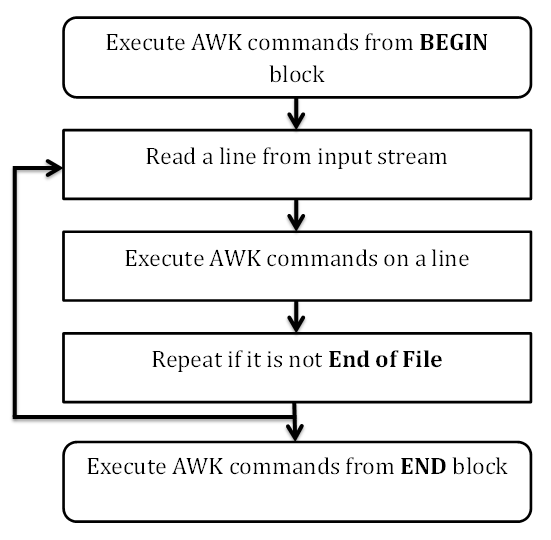
学习的架构-5大部分
- 格式
# 格式
$ awk [-F 域分隔符号] 动作 文件名总结:动作都是用{ }包裹的,最最外边还是' '包裹
awk '{print $2 "--" $3}' auto-push-to-github.sh- 变量
变量NF表示当前行有多少个字段(从1开始数)
变量NR表示当前处理的是第几行(从1开始数)
总结:比较的时候,直接用变量,输出的时候要加上$
awk 'NR>1 {print $2 "--" $3}' auto-push-to-github.sh- 函数
awk还提供了一些内置函数,方便对原始数据的处理。
- 条件,比如比较/正则表达式
awk允许指定输出条件,只输出符合条件的行。
$ awk '条件 动作' 文件名

# 正则表达式只输出包含usr的行。只输出包含usr的行。
$ awk -F ':' '/usr/ {print $1}' demo.txt

# 输出奇数行
$ awk -F ':' 'NR % 2 == 1 {print $1}' demo.txt- if语句
awk提供了if结构,用于编写复杂的条件。
$ awk -F ':' '{if ($1 > "m") print $1}' demo.txt

$ awk -F ':' '{if ($1 > "m") print $1; else print "---"}' demo.txt
<font style="background:pink">Linux系统中grep命令是一种强大的文本搜索工具,它能使用正则表达式搜索文本,并把匹配的行打印出来。grep全称是Global Regular Expression Print,表示全局正则表达式版本,它的。
- grep家族包括
- grep
- egrep
- egrep和fgrep的命令只跟grep有很小不同。
- egrep是grep的扩展,支持更多的re元字符
- fgrep
- fgrep就是fixed grep或fast grep,它们把所有的字母都看作单词,也就是说,正则表达式中的元字符表示回其自身的字面意义,不再特殊。
- linux使用。它功能更强,可以通过
-G、-E、-F命令行选项来使用egrep和fgrep的功能
1.格式和主要参数
grep [options]
主要参数:  grep --help可查看
	-c:只输出匹配行的计数。「count,v.计数」
	-i:不区分大小写。「ignore,v.忽略」
	-h:查询多文件时不显示文件名。「我也不晓得这个有啥用,文件名不是帮助我们找源代码的嘛。。」
	-l:查询多文件时只输出包含匹配字符的文件名。「感觉和上面选项互补」
	-n:显示匹配行及行号。「num」good,更好的帮助定位源代码位置
	-s:不显示不存在或无匹配文本的错误信息。
	-v:显示不包含匹配文本的所有行。「哈哈,这个要干啥?压榨服务器性能?」
--color=auto :可以将找到的关键词部分加上颜色的显示。- grep跳过某文件夹
- 虽然help中说“--exclude”可以忽略文件和目录,可是实际测试中发现并不能忽略目录
- 所以,要排除目录,还得用“--exclude-dir”
XXXX@kXXXXX:~/whoway$ ls
riscv_gcc  onw  two
XXXX@kXXXXX:~/whoway$ grep --exclude-dir=riscv_gcc/ aaa *
grep: onw: Is a directory
grep: two: Is a directory
XXXX@kXXXXX:~/whoway$ grep --exclude-dir=riscv_gcc/ aaa * -r
onw/one.c:aaa
two/twoo.c:aaa

其实grep --exclude-dir riscv_gcc/ aaa * -r
这个的=号不加也行2.官方翻译grep --help
Usage: grep [OPTION]... PATTERNS [FILE]...
Search for PATTERNS in each FILE.
Example: grep -i 'hello world' menu.h main.c
PATTERNS can contain multiple patterns separated by newlines.

Pattern selection and interpretation:
  -E, --extended-regexp     PATTERNS are extended regular expressions
  -F, --fixed-strings       PATTERNS are strings
  -G, --basic-regexp        PATTERNS are basic regular expressions
  -P, --perl-regexp         PATTERNS are Perl regular expressions
  -e, --regexp=PATTERNS     use PATTERNS for matching
  -f, --file=FILE           take PATTERNS from FILE
  -i, --ignore-case         ignore case distinctions in patterns and data
      --no-ignore-case      do not ignore case distinctions (default)
  -w, --word-regexp         match only whole words
  -x, --line-regexp         match only whole lines
  -z, --null-data           a data line ends in 0 byte, not newline

Miscellaneous:「杂项」
  -s, --no-messages         suppress error messages
  -v, --invert-match        select non-matching lines
  -V, --version             display version information and exit
      --help                display this help text and exit

Output control:「输出控制」
  -m, --max-count=NUM       stop after NUM selected lines
  -b, --byte-offset         print the byte offset with output lines
  -n, --line-number         print line number with output lines
      --line-buffered       flush output on every line
  -H, --with-filename       print file name with output lines
  -h, --no-filename         suppress the file name prefix on output
      --label=LABEL         use LABEL as the standard input file name prefix
  -o, --only-matching       show only nonempty parts of lines that match
  -q, --quiet, --silent     suppress all normal output
      --binary-files=TYPE   assume that binary files are TYPE;
                            TYPE is 'binary', 'text', or 'without-match'
  -a, --text                equivalent to --binary-files=text
  -I                        equivalent to --binary-files=without-match
  -d, --directories=ACTION  how to handle directories;
                            ACTION is 'read', 'recurse', or 'skip'
  -D, --devices=ACTION      how to handle devices, FIFOs and sockets;
                            ACTION is 'read' or 'skip'
  -r, --recursive           like --directories=recurse
  -R, --dereference-recursive  likewise, but follow all symlinks
      --include=GLOB        search only files that match GLOB (a file pattern)
      --exclude=GLOB        skip files that match GLOB
      --exclude-from=FILE   skip files that match any file pattern from FILE
      --exclude-dir=GLOB    skip directories that match GLOB
  -L, --files-without-match  print only names of FILEs with no selected lines
  -l, --files-with-matches  print only names of FILEs with selected lines
  -c, --count               print only a count of selected lines per FILE
  -T, --initial-tab         make tabs line up (if needed)
  -Z, --null                print 0 byte after FILE name

Context control:「上下文控制、上下文控制」
  -B, --before-context=NUM  print NUM lines of leading context
  -A, --after-context=NUM   print NUM lines of trailing context
  -C, --context=NUM         print NUM lines of output context
  -NUM                      same as --context=NUM
      --color[=WHEN],
      --colour[=WHEN]       use markers to highlight the matching strings;
                            WHEN is 'always', 'never', or 'auto'
  -U, --binary              do not strip CR characters at EOL (MSDOS/Windows效率笔记)

When FILE is '-', read standard input.  With no FILE, read '.' if
recursive, '-' otherwise.  With fewer than two FILEs, assume -h.
Exit status is 0 if any line (or file if -L) is selected, 1 otherwise;
if any error occurs and -q is not given, the exit status is 2.

Report bugs to: bug-grep@gnu.org
GNU grep home page: <http://www.gnu.org/software/grep/>
General help using GNU software: <https://www.gnu.org/gethelp/>
3.egrep加上-n显示行数
[root@iZwz9ivqsnyj6hi71t3pamZ ~]# egrep 'now6' test.cpp
//												      int now6=now5+tag[6];
//												      if(now6==n)
//												      else if(now6>n)

[root@iZwz9ivqsnyj6hi71t3pamZ ~]# egrep 'now6' test.cpp  -n
87://												      int now6=now5+tag[6];
88://												      if(now6==n)
93://												      else if(now6>n)
3.GNU的sed的使用学习
处理文件的方式:
awk处理文本和数据的方式和sed相似,都是逐行扫描文件,从第一行到最后一行